

Accessing your account is as easy as a few taps or clicks. The COW678 login process is designed to be fast, secure, and hassle-free — so you can get straight to the games without any delays. Whether you’re logging in on desktop or through the COW678 app, this guide walks you through everything you need to know about the City of Wins login process — from step-by-step instructions to troubleshooting common issues and keeping your account secure.
What Is COW678 Login?
The COW678 login is the gateway to your personal City of Wins account. It is the process of signing in to your registered COW678 account using your username and password — giving you full access to everything the platform has to offer, from the game library and promotions to deposits, withdrawals, and customer support.
Every registered player has a unique login credential that keeps their account secure and personal. Whether you’re accessing the platform on desktop or through the COW678 app, your login details remain the same — making it easy to switch between devices without any hassle.
How to COW678 Login: Step-by-Step Guide
Logging in to your account is straightforward and takes just a few seconds. Here’s how to access your account:
Step 1: Visit the Official COW678 Website or Open the App
Go to the official COW678 website on your browser or launch the app on your Android or iOS device.
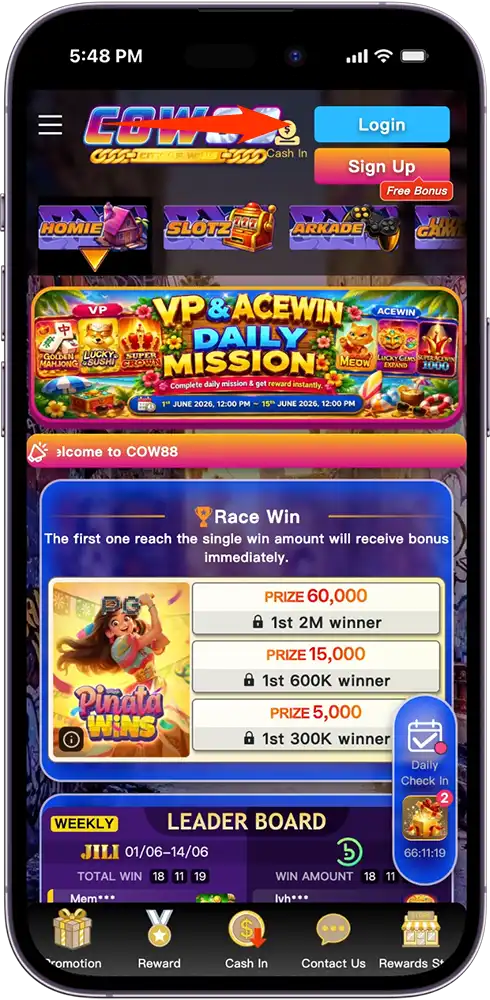
Step 2: Click or Tap the Login Button
Look for the Login button on the homepage and click or tap it to proceed.
Step 3: Enter Your Credentials
Input your registered login name or username and password in the provided fields.
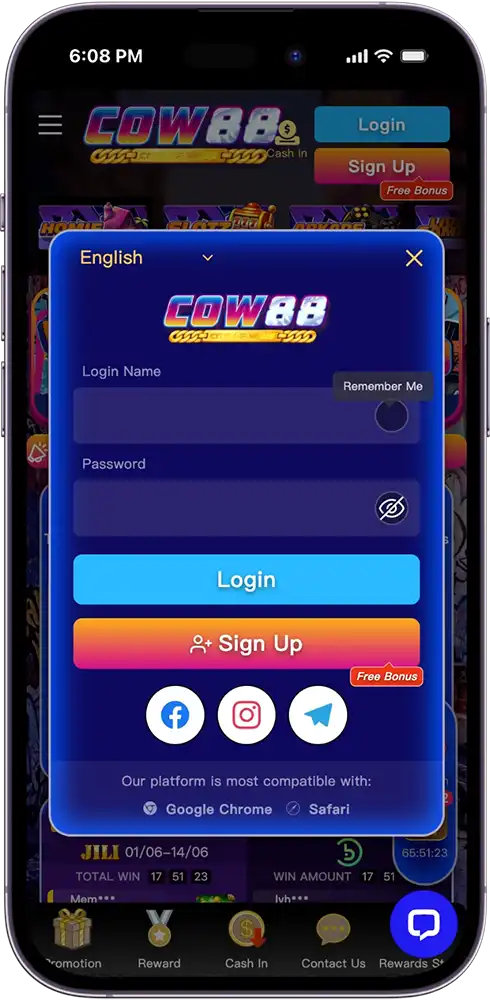
Step 4: Click or Tap Login
Hit the login button to access your account instantly.
Step 5: Start Playing
Once logged in, you have full access to your account, game library, promotions, and more.
For a faster and more convenient City of Wins login experience, we recommend enabling biometric authentication on the COW678 app so you can log in using your fingerprint or face ID.
Login via Desktop and Mobile App
The login process is available on both desktop and the app — and both are equally fast and straightforward. Here’s a quick comparison:
| Desktop | COW678 App | |
| Access | Via official website on any browser | Via COW678 app on Android or iOS |
| Login Method | Username and password | Username and password or biometric login |
| Best For | Larger screen, immersive gaming sessions | On-the-go access anytime, anywhere |
| Bookmark/Shortcut | Bookmark the official site for faster access | App icon on your home screen |
Whichever device you prefer, the City of Wins login experience is designed to get you into your account quickly and securely.
Forgot Your COW678 Login Details?
Forgetting your login credentials happens — and at COW678, we’ve made it easy to recover your account. If you’ve forgotten your username or password, here’s what you can do:
Forgot your password?
Click or tap the Forgot Password link on the login page and follow the instructions to reset your password via your registered email address or mobile number.
Forgot your username?
Contact us via live chat, phone, or email and provide your registered email address or mobile number to retrieve your username.
To avoid losing access to your account, we recommend storing your login credentials in a secure password manager and keeping your registered email address and mobile number up to date at all times.
COW678 Login Issues and How to Fix Them
Encountering issues during the login process is rare, but here are the most common problems players run into and how to resolve them quickly:
“Incorrect username or password”
Double-check that your username and password are entered correctly. Make sure your caps lock is off and that there are no extra spaces in your credentials.
Account locked or suspended
If your account has been locked due to multiple failed login attempts, contact us for assistance in unlocking your account.
Page not loading or timing out
Check your internet connection and try refreshing the page. If the issue persists, try clearing your browser cache or switching between the app and the desktop site.
Biometric login not working
If fingerprint or face ID login is not working on the app, try logging in manually using your username and password and re-enable biometric authentication in your account settings.
App not opening or crashing
Make sure your COW678 app is updated to the latest version. If the issue persists, try uninstalling and reinstalling the app from the official source.
If you encounter any issue not listed here, our 24/7 customer support team is always available via live chat, phone, or email to help you regain access to your login account without delays.
Tips for a Secure City of Wins Login
Keeping your login credentials safe is just as important as enjoying the games. Here are some simple but effective tips to protect your account:
Use a strong and unique password
Your password must be 8-15 characters long and include at least 1 capital letter, 1 small letter, and 1 number. Avoid using easily guessable passwords like birthdays or simple number sequences.
Never share your login credentials
Keep your username and password strictly to yourself. COW678 will never ask for your password through any channel.
Enable biometric login
Use fingerprint or face ID on the app for a faster and more secure login experience.
Log out after every session
Especially when using a shared or public device, always log out your account after every session to prevent unauthorized access.
Use only official channels
Always log in through the official COW678 website or app. Avoid clicking on suspicious links or logging in through third-party sites.
Keep your registered details updated
Make sure your email address and mobile number are always current so you can recover your account quickly if needed.
Log In to COW678 and Dive Back Into the Action
Your next winning session is just a COW678 login away. Whether you’re returning to finish a game, claim a promotion, or simply enjoy everything City of Wins has to offer, logging in takes just a few seconds and puts the full platform experience right at your fingertips. If you don’t have an account yet, registration is quick and easy — it only takes a few minutes to get started.
Frequently Asked Questions (FAQs)
How do I COW678 login?
Visit the official COW678 website or open the app, click or tap the login button, enter your registered username and password, and you’re in.
What do I do if I forgot my COW678 login password?
Click the Forgot Password link on the login page and follow the instructions to reset your password via your registered email address or mobile number.
Can I log in to COW678 on both desktop and mobile?
Yes. The COW678 login process is available on both desktop via the official website and on mobile through the COW678 app on Android and iOS devices.
Is the COW678 login process secure?
Yes. COW678 uses industry-standard security measures to protect your account. We also recommend enabling biometric login on the app and never sharing your credentials with anyone for added security.
What should I do if I can’t log in to my City of Wins account?
Check that your username and password are entered correctly. If the issue persists, contact our 24/7 customer support team via live chat, phone, or email for immediate assistance.